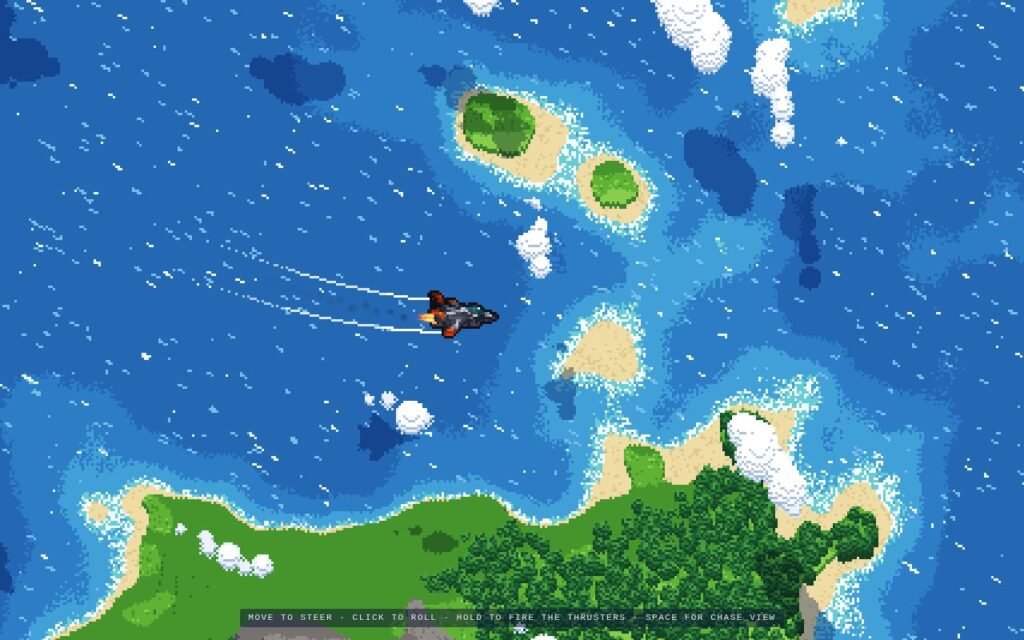
Dash’s browser-based fighter jet scene has the appeal of a tiny flying toy with its settings panel left open. The creator’s preview shows a jet streaking over blue water and green islands, with white trails curling behind its wings. Open the controls and the scenery, aircraft and camera all become things to adjust.
Dash shared the project on X, describing it as using no 3D engine, no polygons and 32 KB of code. The demo is available here.
The preview’s instructions are straightforward: move the pointer to steer, click to roll, hold to fire the thrusters, and press Space for a chase view. The settings also list overhead, chase and cockpit cameras, so the same scene can be framed as a little aircraft crossing a map or a view from closer to the flight.
## Change the Aircraft, Camera and Sky
Speed and turn rate are only the start. The panel offers cruising altitude, ground clearance and wingmen, alongside island and cloud settings. Day, sunset and night options let you change the scene’s lighting, while body, accent and canopy colours give the aircraft its own palette.
There are smaller visual choices too: pixel size, wingtip trails and different thruster-flame styles. The panel also offers chase and cockpit views alongside its overhead option.
The creator’s preview captures why the overhead view works so well. Pale beaches break up the blue sea, clouds throw dark shapes across the water, and the jet’s trails make its route easy to follow. There’s plenty to look at before touching a setting. Having the switches within reach makes the little scene feel like something to take apart and rearrange.
Image: Dash / UI8 Forge.